
2.9.0 release target; current-source Windows candidate evidence
Package applicability is under review; follow the stated version and platform limits.
Before starting
Use the matching JoSIM®-Pro release and its installed examples. Simulation requires the SUN Magnetics License Manager, a reachable smlicensed daemon and a valid licensing setup. Continue degraded is an inspection/recovery path, not a licensed simulation path.
Run the example
- Launch JoSIM®-Pro using the installed application launcher. On Linux, use the provided josim-pro-gui wrapper so the runtime library path is prepared.
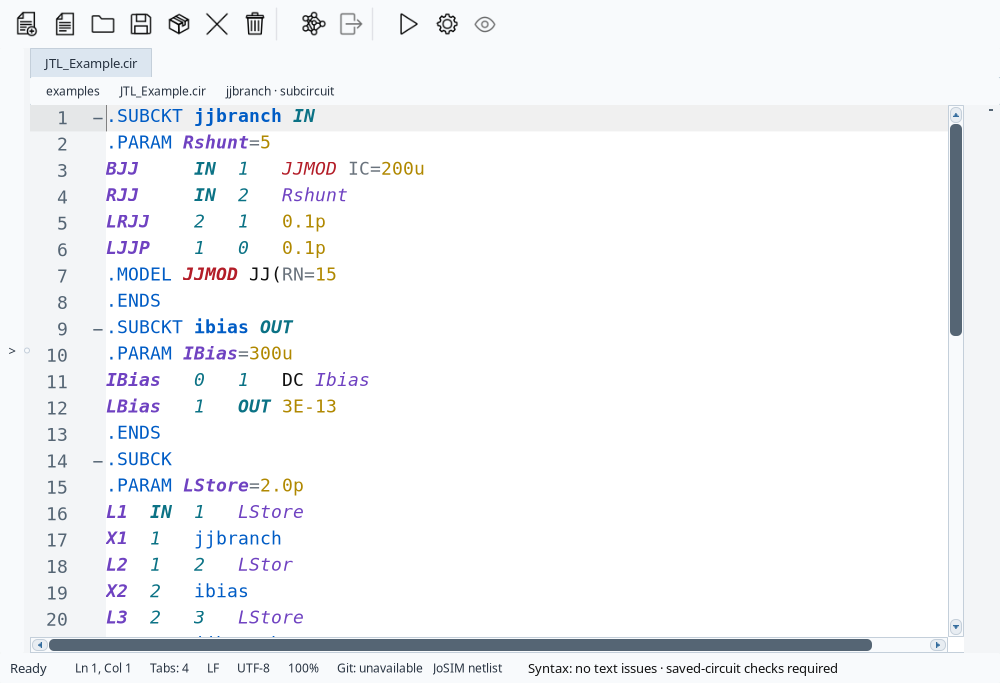
- Use File > Open Folder... to open the installed examples directory, then open JTL_Example.cir. Work on a copy if you intend to edit it.
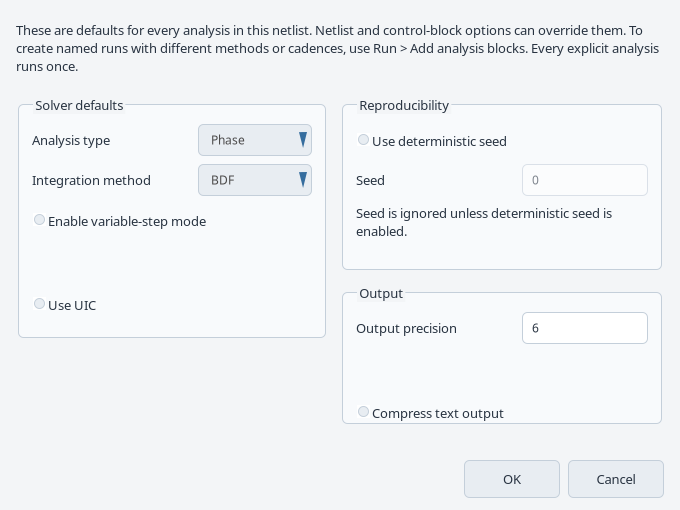
- Keep the supplied run settings for the first simulation. With the source netlist active, press the Run toolbar button.
- Wait for completion and inspect the requested traces in Results. An imported CSV/TSV result tab is for inspection; open the .cir source to run a simulation.
Command-line alternative
From a writable copy of the example directory, the manual gives:
josim-pro-cli -o JTL_Example.csv JTL_Example.cirCheck the result
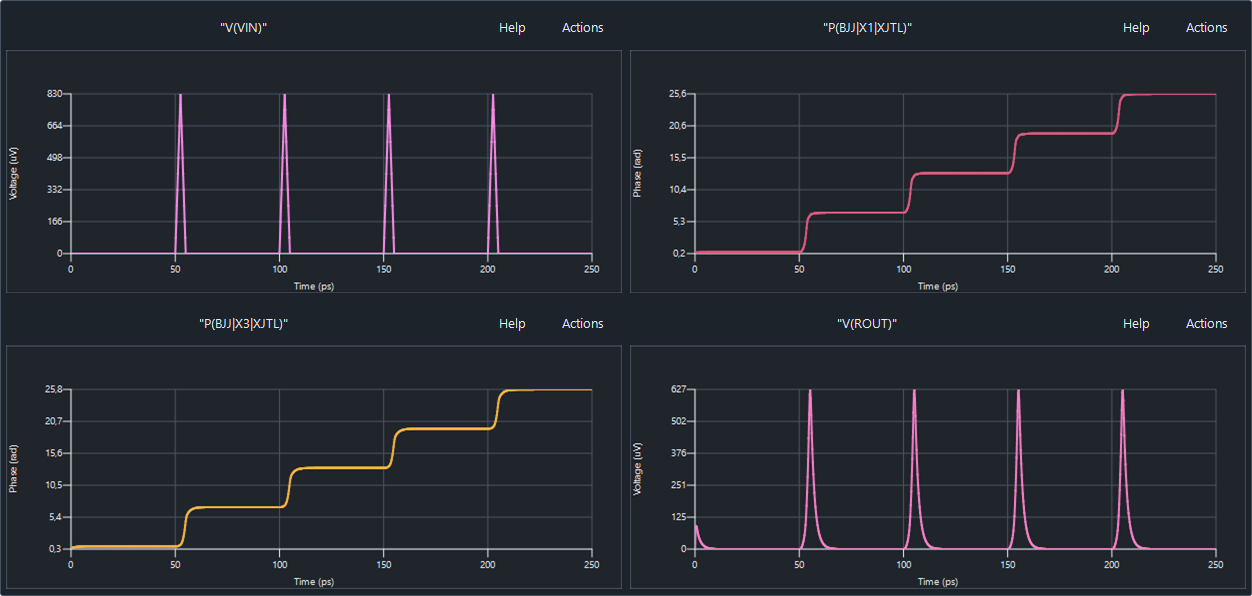
The recorded licensed Windows GUI candidate produced 1,001 finite samples across four named traces from 0 to 250 ps: V(VIN), P(BJJ|X1|XJTL), P(BJJ|X3|XJTL) and V(ROUT). The earlier 2.9 CLI check also produced this sample count and time span.
Check the trace names, time coverage and units in your own current result. The displayed voltage axes use microvolts and time uses picoseconds; the numerical CSV uses volts and seconds, while phase is in radians.
This establishes scoped execution and output integrity for the recorded inputs and runtime. It does not establish physical accuracy, a solver regression tolerance, the complete walkthrough or final distributed-package applicability.
Reopen the saved source after exit
Save the netlist and record its location before closing. In the checked Windows source candidate, normal exit cleared the saved tab session and the next process restored no active document. This is tracked as KB-GUI-007; do not rely on automatic restoration for that candidate.
If no document returns, explicitly open your saved JTL_Example.cir source, verify its path and run again. This manual reopen-and-run route passed in a separate process before CSV export. It does not repair automatic restoration or establish that previous in-memory results survived exit.
Sources and verification details
Recorded inputs/builds only. Complete walkthrough and final-package acceptance remain separate.
VAL-003 · JoSIM®-Pro 2.9.0 Windows review build; release target
CLI transient and output integrity
This earlier CLI check verifies finite traces and time coverage on the 2.9 review build. Later scoped native candidate evidence is VAL-016; complete GUI and final-package checks remain pending.
VAL-012 · JoSIM®-Pro 2.9.0 Windows review runtime; CPython 3.13.11 and NumPy 2.5.4 in an isolated environment
Packaged JTL through Python Input/Matrix/Simulation, raw and named arrays, formatted output axis and CSV writer; the same current CLI produced exactly matching parsed CSV
Execution, finite data, shape/time coverage and same-engine interface agreement. No independent physical reference, convergence, GUI, other interpreter/platform or final-release qualification.
VAL-016 · JoSIM®-Pro 2.9 current-source Windows candidate with matching freshly built runtime; not the final distributed package
Production GUI controls, normal licensed JTL and AND runs, missing-include restoration, exact input/output collision rejection and operator-assisted CSV/All traces export. Explicitly reopening saved JTL and rerunning also passed
Automatic session restoration failed (KB-GUI-007). File opening was supplied at the production OpenFile boundary; folder-picker input, cancellation, retry, other export formats, physical accuracy and final-package acceptance remain unverified. CSV/CLI differences were at most one ULP in this example, not an accuracy or regression tolerance. The Clang-built runtime does not close the separate MSVC/OpenMP finding KB-BUILD-001. External Computer Use capture remains unqualified.
josim-jtl-editor
JoSIM®-Pro 2.9 manual UI reference
A maintained manual UI reference, not a fresh calculation or a completed walkthrough. Final distributed-package applicability remains to be checked.
josim-run-settings
JoSIM®-Pro 2.9 manual UI reference
A maintained manual UI reference, not a fresh calculation or a completed walkthrough. Final distributed-package applicability remains to be checked.
josim-jtl-current-waveforms
Windows JoSIM®-Pro 2.9 current-source native scenario, 3 November 2026
Illustrates the recorded candidate state. The Save dialog was completed by the owner. Full article acceptance, automatic session restoration and final distributed-package applicability remain pending.
- josim-pro:docs/manual_source/sections/gui_quick_start.tex · GUI Quick Start: First Simulation
- validation:windows-cli-20261102 · VAL-003; scope and limits recorded
- owner:technical-review-20261102 · JoSIM®-Pro 2.9 chosen as the public starting path; release availability must be checked before publication
- validation:windows-workflows-20261103 · VAL-011/VAL-012; exact route, runtime and evidence limits
- validation:josim-native-windows-20261103 · VAL-016; exact native actions, independent output checks, operator Save and failed automatic-restoration boundary
- The owner selected 2.9 for the public starting path. Historical 2.7 control runs remain internal; the website shunted-junction bundle is a separate example.
- VAL-016 adds normal licensed native run and explicitly reopened-source checks. Folder-picker interaction, complete walkthrough, physical validation and final release-package checks remain pending. Automatic restoration failed (KB-GUI-007).