
8 beta/preview
Package applicability is under review; follow the stated version and platform limits.
Before starting
Use a matching Studio/Core/TTH installation with an issued InductEx® licence and a writable complete project. For the reproducible teaching case, download the complete inline microstrip ZIP, extract all three files together and open strip.ixi. Its process is an example, not a calibrated fabrication stack.
The checked route uses the current Windows source candidate. Final distributed-package behavior still needs review. Save the IXI and any edited process/netlist files before beginning.
Steps
- Open the folder and make strip.ixi the active IXI tab. Choose Run > Initialise / Reset, then wait until Premesh becomes available. This starts a new in-memory Core session; old output files do not initialize it.
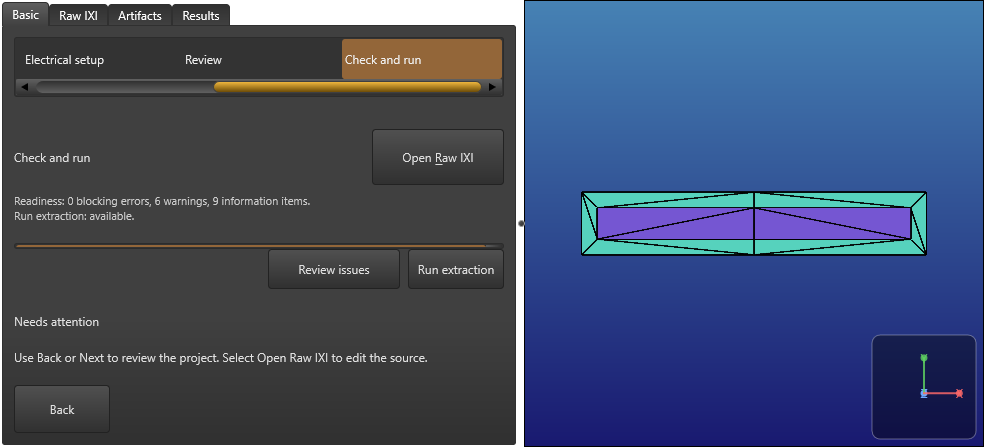
- Choose Run > Premesh. Wait until Mesh becomes available, then inspect the coarse geometry beside Basic or Raw IXI. Check that the intended strip, process layers and port labels are defined in the source. A geometry preview alone does not prove port connectivity.
- Choose Run > Mesh and wait until Run solver becomes available. In this candidate, Live Mesh can retain the coarse Premesh view; use the actual output/strip.msh file for post-mesh inspection as explained below.
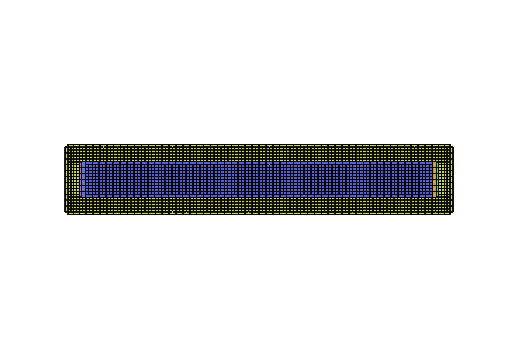
- Open output/strip.msh through Artifacts or File > Open. Use Fit all to inspect the current generated mesh. Close that mesh tab or return to the IXI tab before choosing Run > Run solver.
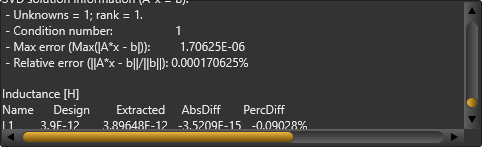
- Wait for the new Results verdict and inspect Raw output, the L1 row and units. For the unchanged teaching case, the recorded GUI result is 3.89648e-12 H. Keep the saved input identity with this result.
- After source changes, save and start again with Initialise / Reset. Reverting the text to its old value does not resume an older revision. After closing and reopening Studio, initialize again before using the staged commands.
Why Live Mesh can look unchanged after Mesh
The checked candidate logs Mesh completed, then IXI_PREMESH_SNAPSHOT_KIND_INVALID while converting its snapshot for display. The staged viewport retains the prior Premesh payload and run identity. This is tracked as KB-GUI-009; an unchanged picture is not accepted as the newly segmented mesh.
Opening the actual current output/strip.msh worked in the recorded scenario. That file contained 16038 nodes and 3780 MSH elements; its renderer produced 22536 triangles, compared with 20 triangles in the coarse preview. These are different representations. Rendering triangles and MSH element counts are not solver filament/unknown counts or runtime estimates.
Recalculate and rerun
Recalculate remains disabled in the maintained source and every checked staged state, including after a successful solver stage. A visible menu entry does not establish an available operation. Use Initialise / Reset followed by the stages again, or use the normal Run full extraction / Basic Run again path for a complete new calculation.
To cancel, use Run > Stop and wait for the final verdict. A Cancelled receipt can retain numeric output and is not a completed solve. The current-results guide records the normal full-run Stop/retry distinction and recovery.
Check the result
Three actual staged solves completed with the unchanged teaching input: the initial sequence, a reset after source editing/restoration and a new sequence in a separate process. Each reported L1 = 3.89648e-12 H at GUI precision, matching the independently checked CLI reference. This is reproducibility evidence for these inputs, not a physical-accuracy or convergence criterion.
The command order was enforced: initialization enabled Premesh, Premesh enabled Mesh and Mesh enabled Run solver. Saving a source edit marked geometry stale and disabled continuation. Restart restored the source but provided no current result or resumable staged payload.
If the problem remains
Check the active saved IXI, normal licence state and the current diagnostic log. Start with Initialise / Reset when a stage is disabled after a source edit, reset or restart. Do not treat an old .msh file, retained picture or earlier Completed label as proof of a current run.
Keep each attempted input and its output together. For the retained-preview diagnostic, open the current generated mesh and retain the exact package version for support. KB-GUI-009 remains open; this inspection route is not a product fix. Close extra tabs before restart when using the current single-tab restoration workaround (KB-GUI-006).
Sources and verification details
Recorded inputs/builds only. Complete walkthrough and final-package acceptance remain separate.
VAL-024 · Frozen Windows Studio source candidate with normal Core 8.0.1 dispatch, 3 November 2026; final distributed-package acceptance pending
Normal licensed Initialise / Reset, Premesh, Mesh and Run solver; command-order guards, source invalidation/reset, actual generated .msh inspection and separate-process single-tab restart/recovery. Predetermined paths were supplied at production dialog boundaries
Twenty independent checks cover the stated routes. Live Mesh retains Premesh after Mesh with IXI_PREMESH_SNAPSHOT_KIND_INVALID (KB-GUI-009); segmented Live Mesh is not accepted. Recalculate is disabled. Physical pickers, field plots, group/view manipulation, complete GUI articles, final distributed packages, other platforms, physical accuracy and mesh convergence remain pending. KB-GUI-006 and KB-GUI-008 remain separate.
studio-staged-premesh
Frozen Windows Studio source candidate, actual native staged workflow, 3 November 2026
This image illustrates its stated stage or file only. The retained Premesh after Mesh is KB-GUI-009; no segmented Live Mesh, physical accuracy, full article or final-package acceptance is inferred.
studio-generated-strip-mesh
Frozen Windows Studio source candidate, actual native staged workflow, 3 November 2026
This image illustrates its stated stage or file only. The retained Premesh after Mesh is KB-GUI-009; no segmented Live Mesh, physical accuracy, full article or final-package acceptance is inferred.
studio-staged-solver-result
Frozen Windows Studio source candidate, actual native staged workflow, 3 November 2026
This image illustrates its stated stage or file only. The retained Premesh after Mesh is KB-GUI-009; no segmented Live Mesh, physical accuracy, full article or final-package acceptance is inferred.
- inductex:docs/manual/studio_projects.tex · Staged calculations
- inductex:docs/manual/studio_start.tex · Inspect the model before solving
- validation:studio-stages-native-windows-20261103 · VAL-024; real staged sequence, source invalidation, actual generated mesh, restart and the separate retained-preview finding
- VAL-024 adds twenty independent native checks and three manually reviewed exact PNGs. Staged solver success is distinct from the open segmented-preview finding KB-GUI-009.
- Recalculate is unavailable in this candidate. Physical pickers, remaining viewer/field interactions and final distributed-package acceptance remain pending. Twenty independent checks cover the stated routes. Live Mesh retains Premesh after Mesh with IXI_PREMESH_SNAPSHOT_KIND_INVALID (KB-GUI-009); segmented Live Mesh is not accepted. Recalculate is disabled. Physical pickers, field plots, group/view manipulation, complete GUI articles, final distributed packages, other platforms, physical accuracy and mesh convergence remain pending. KB-GUI-006 and KB-GUI-008 remain separate.