
2.9.0 release target; current Windows native schematic and saved-layout checks
Package applicability is under review; follow the stated version and platform limits.
Keep the netlist as the electrical source
The visualizer draws parsed component blocks and connections. Moving or rotating a block changes the drawing; editing the netlist changes circuit connectivity or values. Editing an exported PNG/SVG does not update the circuit. Use the complete source and current numerical report when deciding what the circuit does.
Use a compatible licensed JoSIM®-Pro 2.9 GUI. This guide checks a frozen maintained Windows candidate, not every final distributed package. Save dependent includes explicitly before preparing the view. The visualizer has a separate parser from simulation and static editor analysis; success in one route does not prove success in another.
Extract the complete small hierarchy
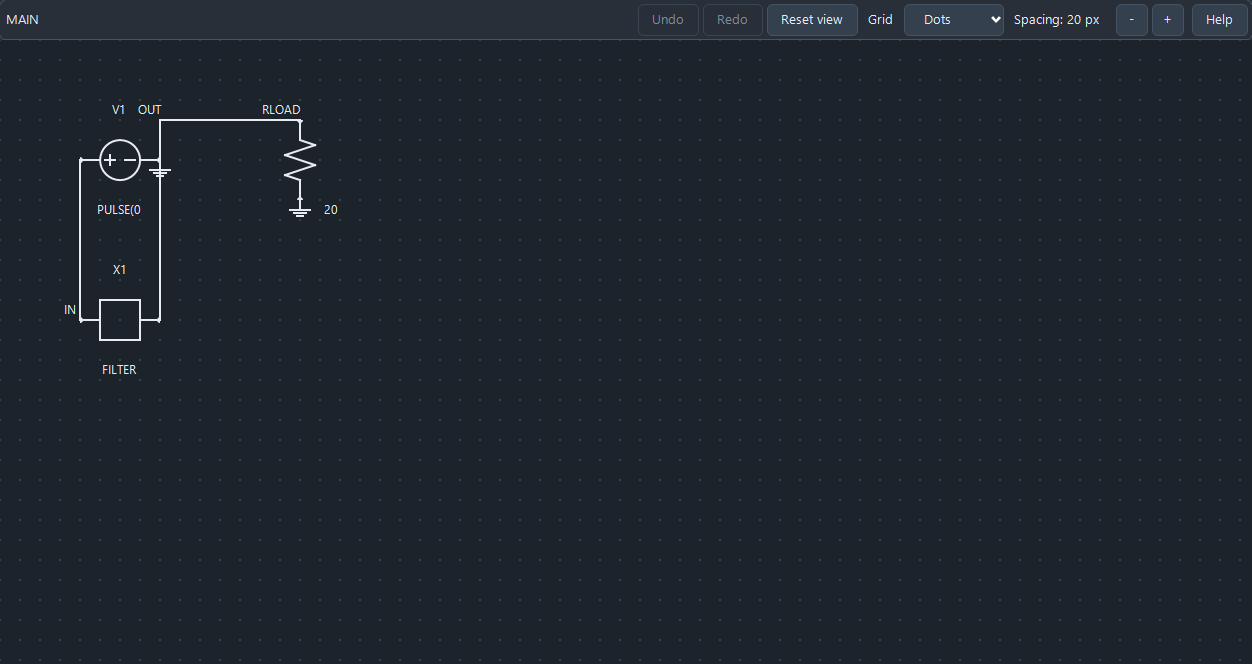
The three-file download contains main.cir, filter.cir and quoted-include.cir. Open main.cir for the supported teaching route and keep filter.cir beside it. V1 drives IN with a 1 mV pulse; X1 instantiates FILTER between IN and OUT; RLOAD is 20 ohms. The cell contains R1 = 10 ohms and C1 = 1 pF.
quoted-include.cir is an explicitly labelled counterexample for KB-SCHEM-001. Its quoted include runs successfully but the exercised Windows visualizer rejects the quotes as path characters. main.cir uses the adjacent unquoted filename filter.cir, which has no spaces. Do not strip required quoting from arbitrary real-project paths. Preserve the simulation-valid source and use an appropriate complete viewing copy when needed.
Open and arrange the root schematic
- Open main.cir, then choose the visualizer/Schematic toolbar action. Confirm that MAIN contains V1, X1 and RLOAD. Imported numerical-result tabs contain no netlist to visualize.
- Select RLOAD. Arrow keys move the selected block by a grid step; Shift+arrow uses a larger step. R and Shift+R rotate in opposite directions. Pointer dragging and pan/zoom are described by the manual, while this native check exercises accessible selection and the actual keyboard handlers.
- Use Ctrl/Cmd+Z and Ctrl/Cmd+Y for visualizer layout undo/redo. The check moves RLOAD by one 20-unit grid step, rotates it by 90 degrees, undoes both operations and redoes both.
- Use the grid controls or G to change grid style. Ctrl/Cmd+0 resets the view transform; it does not remove the saved component layout. Read full component expressions in the source rather than relying on an abbreviated diagram label.
Navigate and save a child scope
Do not manually edit the encoded SCHM blocks. They are layout data carried as comments, not circuit elements. Cosmetic changes still modify the file and require Save. In KB-SCHEM-002 the normal modified flag and Save action work, but the layout-only dirty classifier remains false; do not rely solely on a cosmetic label to decide what changed.
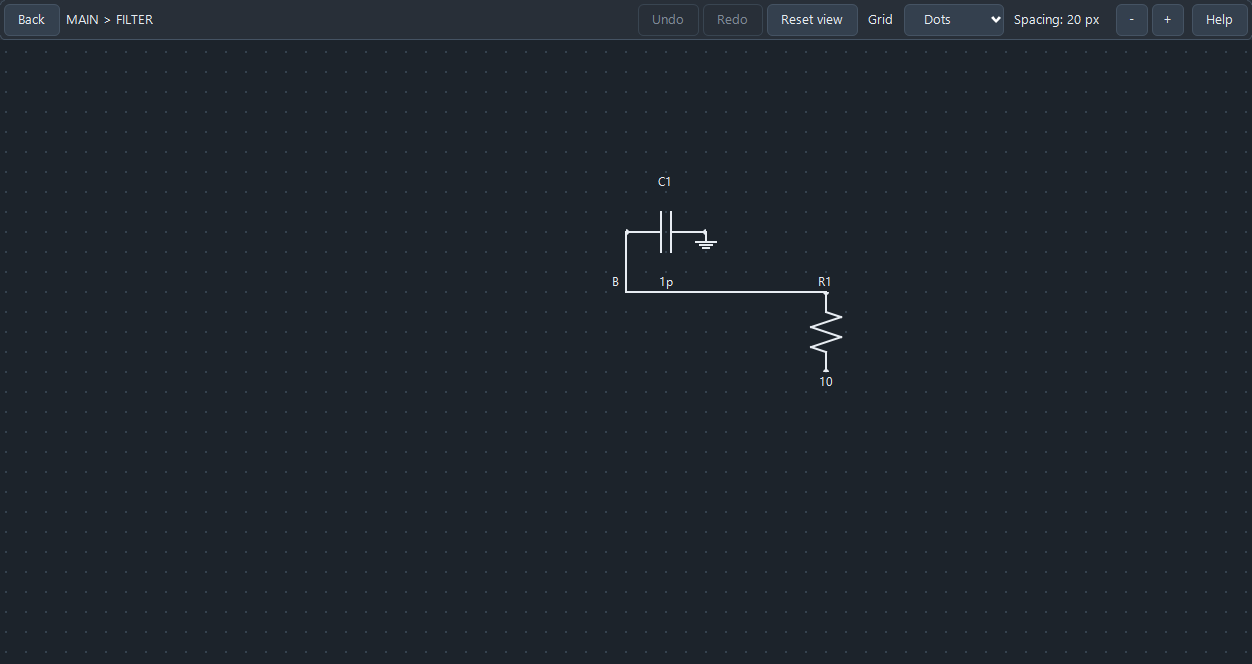
- Open the X1 subcircuit block. The view changes to MAIN > FILTER with R1 and C1. The normal double-click/Enter action enters a resolved subcircuit; the check uses the product’s accessible open action.
- Arrange R1 in this child scope. The check uses Shift+Down and reverse rotation. Back, Backspace or Alt+Left returns to the parent; MAIN and FILTER keep independent named layout payloads.
- Save the netlist explicitly. In this example both SCHM_MAIN and SCHM_MAIN__FILTER tagged comment blocks are written into main.cir, the active host deck; filter.cir remains unchanged. Do not expect the included cell definition to receive the drawing metadata.
- Close and explicitly reopen the saved source in the intended app process, then enter the desired scope again. The checked second process reconstructs both layouts and reproduces both vector exports byte for byte. This is explicit saved-file reopening, not automatic GUI-session restoration.
Export the intended scope after saving
KB-SCHEM-003 reproduces a changed-child export resetting to the root: after a child layout edit, export rebuilds the visualizer and produces the MAIN diagram. A file existing is insufficient proof that the requested child was exported. Saving and re-entering FILTER without another layout edit recovers the correct child SVG.
The exported PNG/SVG is built from the prepared scene and excludes application chrome. The reference images in this guide show the actual native controls instead. A missing output directory was refused; retrying in the existing export directory produced the intended file.
- Save the layout, return to Source and reopen Schematic. Re-enter the exact child scope you intend to export. Confirm its visible scope label and component names.
- Use the schematic export toolbar action. Choose PNG image for raster output or SVG vector schematic for scalable output, and select an existing writable folder. The selected filter supplies a missing extension. The native checks exercise the production writers; physical OS picker input is not qualified.
- Inspect the actual new file. MAIN should contain V1/X1/RLOAD; FILTER should contain R1/C1. If the wrong scope appears, repeat the save/reopen/re-enter sequence and export to a new destination.
- Keep the relevant source revision and scope name with the figure. Use plot export for waveforms or numerical traces; the toolbar chooses its workflow according to the active view.
Distinguish a cosmetic edit from a changed circuit
Every electrical statement in the teaching source remains unchanged through move/rotate/Undo/Redo, hierarchy layout and explicit save. Four fresh simulations—quoted include, supported include, saved arranged deck and reopened arranged deck—produce exactly equal time and trace arrays: 101 samples and two voltage traces each.
That equality checks this cosmetic transformation; it does not establish general physical accuracy, timestep convergence or correctness of an arbitrary diagram. The synthetic RC example is not customer data or a device validation.
A deliberate RMON addition rebuilds the scene with a fourth root component and invalidates the prior numerical result. Restoring the intended source and rerunning produces the original arrays. Refresh/reopen the schematic after semantic source changes and require current results before interpreting a plot.
Recover from a visualization failure
| Observed problem | Next check |
|---|---|
| Visualization Failed with an include error | Keep the complete dependencies, save includes and verify their paths. A missing include must not be accepted as an empty diagram. |
| Quoted include solves but will not visualize | KB-SCHEM-001: separate parser/path limit. The supplied supported route uses an adjacent unquoted simple filename; retain real-project quoting where needed. |
| Subcircuit cannot be opened | Check the target name and reachable saved .SUBCKT definition. Do not infer that an unresolved block is fully represented. |
| Modified file lacks the expected cosmetic classification | KB-SCHEM-002: inspect source changes and save explicitly; current numerical validity is a separate state. |
| Child export contains root components | KB-SCHEM-003: save, return to Source, reopen Schematic, re-enter the child and verify the new file’s component labels. |
| Schematic labels omit part of an expression | Read the complete netlist. The exercised PULSE label is abbreviated and is not an electrical-value authority. |
Scope of the checks
Twenty-seven independent checks cover two normal Windows app processes, 12 matching maintained GUI sources, three complete inputs, decoded root/child layout payloads, layout undo/redo, explicit save, SVG/PNG artifact validity, export scope/recovery, parser rejection/recovery and exactly equal current numerical arrays. Three reproduced limits remain tracked without product fixes.
Physical pointer/picker interaction, arbitrary include grammar/component rendering, external schematic import or electrical editing through the diagram, automatic tab/session restore, other platforms and final packages remain unqualified. The previous manual-only image was replaced by the checked native teaching view; its original reference remains preserved privately.
Save main.cir
* Public RC hierarchy for schematic layout review
.INCLUDE filter.cir
V1 IN 0 PULSE(0 1m 10p 1p 1p 20p 50p)
X1 IN OUT FILTER
RLOAD OUT 0 20
.TRAN 1p 100p
.PRINT V(IN) V(OUT)
.END
Save filter.cir
* Public passive filter cell; nodes A and B are its external pins
.SUBCKT FILTER A B
R1 A B 10
C1 B 0 1p
.ENDS FILTER
Save quoted-include.cir
* Public RC hierarchy for schematic layout review
.INCLUDE "filter.cir"
V1 IN 0 PULSE(0 1m 10p 1p 1p 20p 50p)
X1 IN OUT FILTER
RLOAD OUT 0 20
.TRAN 1p 100p
.PRINT V(IN) V(OUT)
.END
Sources and verification details
Recorded inputs/builds only. Complete walkthrough and final-package acceptance remain separate.
VAL-059 · Frozen maintained Windows JoSIM®-Pro 2.9 candidate
Frozen maintained Windows JoSIM 2.9 native schematic controls, complete passive RC hierarchy and two normal app processes. Accessible selection, keyboard layout Undo/Redo, child navigation, explicit saved comment payloads, prepared PNG/SVG writers, known quoted-include/dirty-classifier/export-scope limits, save/reenter recovery, semantic invalidation and four exactly equal fresh simulation arrays. No arbitrary-model physical accuracy, external schematic import/editing, physical pointer/picker, automatic tab restoration or final-package/platform qualification. Actual browser-downloaded complete three-input ZIP, extracted to a folder with spaces and copied by the bounded launcher into a new isolated native workspace. Both native phases and 27 independent checks repeat; four numerical arrays, saved layouts and two recovered SVG scopes reproduce the earlier evidence. This is not physical OS picker/drag input, direct GUI execution in every arbitrary directory, final-package/platform or physical-device qualification
Synthetic passive RC hierarchy and explicitly retained limitations only. No physical-device accuracy, arbitrary diagram correctness, physical pointer/picker, external schematic import or final-package/platform qualification.
josim-schematic-view
Current-source Windows JoSIM 2.9 native RC schematic scenario, reviewed 4 November 2026
Current parsed teaching scope and cosmetic drawing only. Labels can abbreviate source expressions; the picture is not numerical or final-package acceptance.
josim-schematic-filter-scope
Current-source Windows JoSIM 2.9 native RC schematic scenario, reviewed 4 November 2026
Current parsed teaching scope and cosmetic drawing only. Labels can abbreviate source expressions; the picture is not numerical or final-package acceptance.
- josim-pro:docs/manual_source/sections/gui_visualizer.tex · Visualizer controls, hierarchy, tagged layout persistence and schematic export
- validation:schematic-workflow-20261104 · VAL-059 current RC hierarchy, layout/Undo/Redo, export scope/recovery and equal current numerical arrays
- The former manual-only draft now has a complete checked RC hierarchy and native saved-layout/export workflow. Parser, cosmetic-dirty classification and changed-child export-scope findings remain explicit; no product repair or final-package acceptance is claimed.