
2.9.0 release target; current Windows native diagnostics checks
Package applicability is under review; follow the stated version and platform limits.
Use saved inputs and a valid product licence
Tools > Check saved circuit is the current menu label for the Check Circuit (saved input) action described by the manual. It reads the saved active root and its includes through the licensed core and checks the default circuit/matrix setup. It does not simulate, write waveform output, or qualify independent analysis jobs.
Use a valid JoSIM®-Pro licence and the corrected diagnostics hierarchy. Save or reload the intended revisions of the root and every referenced open include. Other dirty tabs are preserved; do not save unrelated work simply to clear a global dirty indication.
Require an explicit current setup result
- Open the corrected main.cir. If you corrected cells.cir only in its buffer, save it explicitly first. The teaching check refuses a dirty referenced include with Save or reload the referenced source.
- Choose Tools > Check saved circuit. Wait in Tasks and output for the task to finish. Inspect the actual output: Saved input, includes and default circuit/matrix setup passed, followed by No simulation was run.
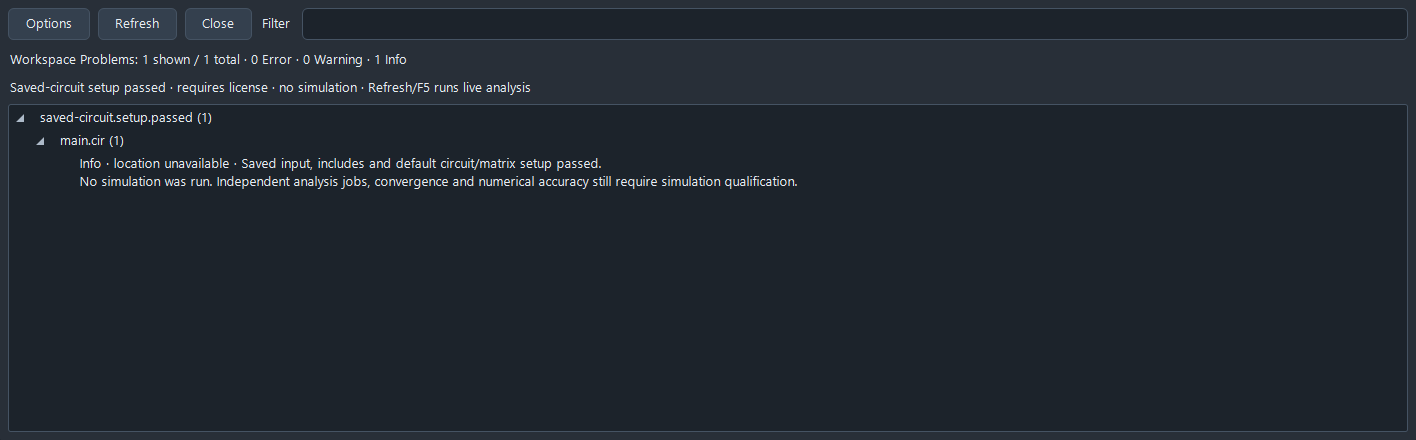
- Choose Latest check in Tasks and output to open that saved-check result in Problems. Require Saved-circuit setup passed. Its informational row has no exact source range; a setup pass is not a source error to navigate.
- Use Refresh/F5 in Workspace Problems to return to licence-free live analysis. This does not rerun the saved check or start a simulation.
- When numerical results are needed, request Run separately and check the current run, traces, units and refinement appropriate to the circuit. The teaching sequence then produces two finite 101-sample voltage arrays; explicit reopening in a second process reproduces them. That is scoped reproducibility, not a general accuracy tolerance.
Recover without confusing check types
| Observed result | Next action |
|---|---|
| Save or reload referenced source | Resolve the intended root/include disk revision and run Check saved circuit again. Refresh alone is a different live check. |
| Licence unavailable | Verify the licence selected for JoSIM®-Pro and the normal local service state; do not replace another product’s licence or treat static inspection as licensed setup. |
| Setup failed | Read the core message and any explicit source file/line/include stack. Correct and save the source, then repeat the check. Do not invent a precise runtime range. |
| Earlier check/task is stale | Treat its output as history. Recheck saved sources after edits, disk changes or external setup-resource changes. |
| Passed setup but no waveform CSV | Expected: no simulation ran. Choose Run separately and select an appropriate result/export workflow. |
Inspect retained Tasks and output
The panel retains recent built-in check and simulation tasks for the current session, with status and output. It is not a general shell runner or debugger. Closing it does not stop a simulation; task history is not persisted across application restart.
Open source preserves an existing dirty buffer. Failure source follows an explicit engine Source: file:line receipt when available; stale or truncated output does not justify applying an old exact offset. Review path-bearing task output before sharing it.
The maintained panel offers cooperative cancellation, but this short setup example does not qualify cancellation timing. Likewise, a passing default setup does not prove convergence, every analysis job, a physical model or final-package/platform behaviour.
Sources and verification details
Recorded inputs/builds only. Complete walkthrough and final-package acceptance remain separate.
VAL-060 · Frozen maintained Windows JoSIM®-Pro 2.9 candidate
Two normal Windows JoSIM 2.9 candidate processes exercise current workspace diagnostics, root/include/related navigation, filters and stale/incomplete recovery, exact single/linked fixes, changed-preview rejection, local/linked Undo/Redo and explicit Save All. Licensed saved setup and numerical Run remain separate. Actual downloaded inputs repeat all 36 checks and reproduce saved corrections and two current arrays; the download review passes twelve comparisons.
Physical pointer/picker interaction, exhaustive grammar/conflicts/cancellation, automatic session restoration, other platforms, final packages and arbitrary-device numerical accuracy remain unqualified.
josim-diagnostics-saved-check
Current-source Windows JoSIM 2.9 native diagnostics teaching scenario, reviewed 4 November 2026
The pictured source/diagnostic state is authentic within the checked teaching scenario; it does not establish numerical accuracy or final-package acceptance.
- josim-pro:docs/manual_source/sections/gui_diagnostics.tex · Live diagnostics, workspace states, reviewed fixes, saved-circuit check and tasks
- validation:diagnostics-workflow-20261104 · VAL-060 native diagnostics and recovery; VAL-061 explicit static API client
- Scoped native evidence and current source/manual claims are explicit. Physical operator paths, complete feature/conflict coverage, platform/final-package checks and numerical accuracy remain separate.