
Fresh current-source Windows 2.9.0 review candidate; final-package/platform checks pending
Package applicability is under review; follow the stated version and platform limits.
Decide what should be written
Autosave writes an existing named source. A recovery checkpoint saves a private snapshot of dirty editor buffers in the configuration directory. Off disables automatic source writes while checkpointing continues. Neither mechanism is a substitute for deliberate saves and independent backups.
Local save history retains successful saved-file versions. Text Undo belongs to the current app session. Recovering a checkpoint creates unsaved copies with empty prior Undo history; it does not replace the original file. Use the linked Local save history guide when the version you need was already saved.
Prepare the teaching files
Download and extract autosave-demo.cir and other.cir together into a fresh writable teaching folder. Work on copies with the intended JoSIM®-Pro 2.9 GUI. These complete synthetic circuits test source handling; this guide accepts no simulation result.
The original autosave-demo.cir uses R1 IN 0 1000. Change that line to R1 IN 0 2000 for the dirty editor state. other.cir is a separate saved focus target. Preserve the original input before trying a different write policy.
Choose the source-write policy
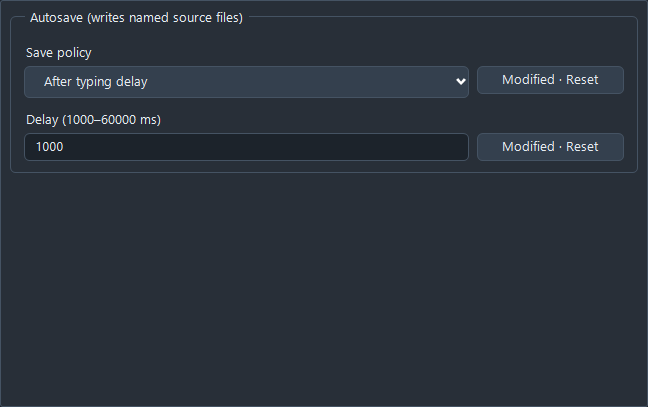
Open Tools > Preferences > Autosave (writes named source files). Choose Off, After typing delay, When leaving an editor or When leaving the window, then accept the preference. The delay accepts 1000–60000 ms and defaults to 2000 ms. The checked teaching run used 1000 ms.
The delay starts after the last text or format change. Focus policies queue an attempt for a safe timer check, rather than guaranteeing an immediate write. The manual describes checks about once per second, with at most one document attempted per check. Active dialogs, simulations, multi-file edits, snippet placeholders and text composition can defer writes; only the dialog case is exercised here.
The native evidence includes a real editor focus change. The window policy is checked through its bound production deactivation handler; a physical OS window switch remains unexercised.
See when disk changes
- Choose Off, open a writable copy of autosave-demo.cir and change R1 to 2000. Wait more than the teaching delay. The buffer stays modified and disk remains at 1000.
- Choose After typing delay with 1000 ms. Wait for a safe check and inspect the status and saved file. In the checked run disk became 2000 and the buffer became clean.
- Undo the edit. Undo remains available after autosave, so the buffer becomes dirty at 1000. With delay autosave still enabled, a later safe check writes that undone version. Undo is not a promise that disk stays unchanged.
- For When leaving an editor, make a fresh edit and switch focus to other.cir. The checked focus change saves the prior named source. Changing the policy alone does not confirm that a particular source was written.
- Review the status before continuing. Autosave writes through the normal selected encoding, line endings, formatting and safe-save rules; confirm the intended source and format rather than inferring success from an elapsed delay.
Recognise a skipped or blocked write
Untitled, recovered and editable-copy buffers need an explicit destination. Autosave never guesses a path or opens Save As. Read-only and imported-result sources are skipped. The checked read-only source stayed dirty with disk unchanged; unlocking it rearmed the automatic write.
Autosave: blocked means the attempt did not complete. Hover for its detail. A missing or externally changed baseline, malformed/oversized source or write failure requires attention. The documented review limits are 2 MiB of disk bytes and 2,097,152 UTF-16 buffer units. The failed attempt is not continuously retried; editing, explicit reconciliation, lock changes or a changed policy can rearm it. Storage failures and every limit boundary remain source-derived instructions, not exercised results.
Resolve an external change deliberately
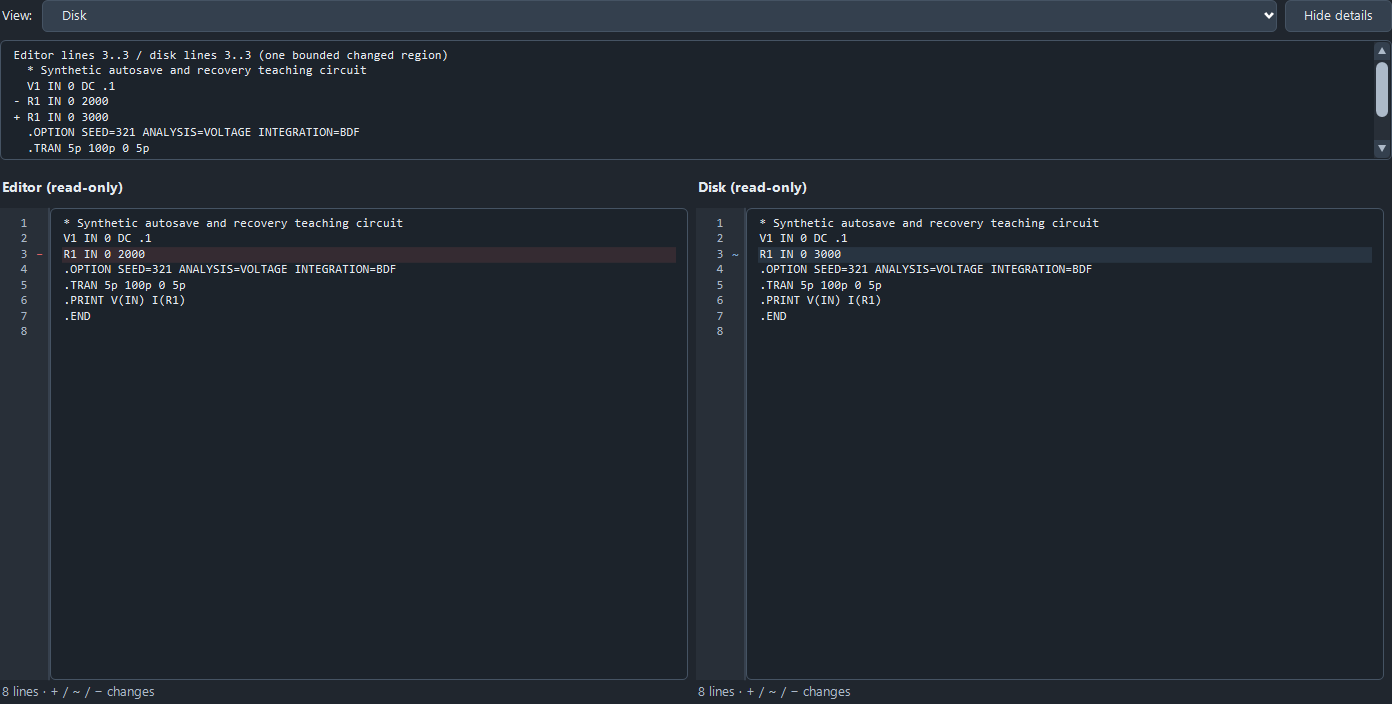
To reproduce the teaching conflict, keep an unsaved editor version at 2000 and use a separate text editor to save 3000 to that same teaching path. Preserve both versions. JoSIM may open Compare to disk automatically; the command is also available under Edit > Navigation.
The checked conflict blocks autosave. The active review and Cancel preserve the external 3000 version and the dirty 2000 buffer. Cancel leaves the disagreement pending. Review the complete Editor and Disk text before choosing a resolution.
Keep editor acknowledges the disk version you just reviewed. It retains the editor text, and a later enabled autosave can write that editor version over the acknowledged disk version. Choose it only when this overwrite is intended. Use Save As to a different path when both versions should remain separate. This is not a lock against a different process changing disk again during the final save.
Recover edits after an interruption
Enable Restore workspace on launch in Preferences if you want startup to restore the available workspace/checkpoints. Recovery checkpoints refresh every ten seconds and when session state is persisted. Only the last successful snapshot is available after an interruption; later edits may be lost.
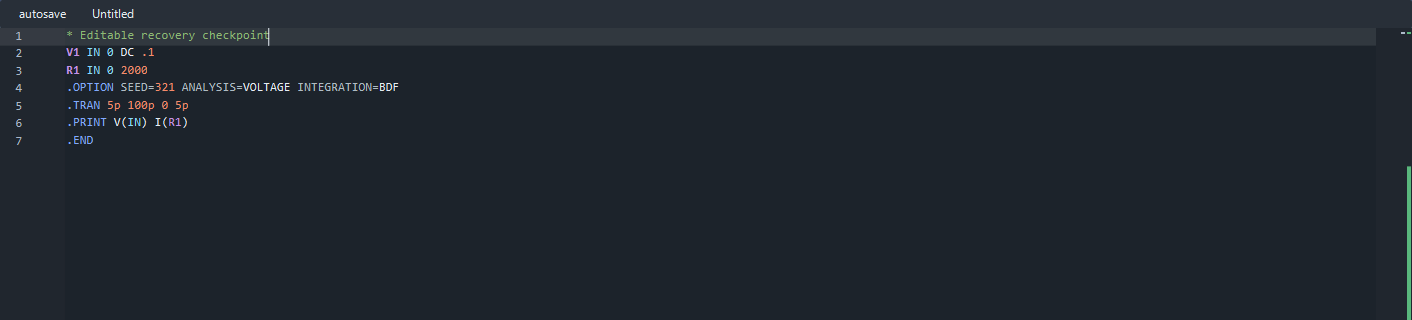
The checked scenario used a separate private profile with Autosave Off. It changed a named buffer to 2000 with UTF-8 BOM / CRLF, created an untitled buffer and an editable copy, then waited for an actual periodic journal refresh. Its parent interrupted only that owned test app process. Normal startup in a new process restored all three as independent modified, unsaved copies, with the active copy selected and the named copy’s text/format retained.
This verifies that bounded interrupted-process path. KB-GUI-007 separately records lost saved-tab session state after normal exit in a checked candidate; it is not resolved by successful checkpoint recovery. Do not rely on automatic saved-tab reopening as a completed capability for that candidate. Split views, caret/fold restoration, power loss and failed checkpoint writes remain outside this exercise.
Review and save the recovered copy
- Inspect the recovered source and its format before running or saving it. An Untitled recovered copy can contain work originally associated with a named file; its label does not mean the buffer is empty.
- Expect a modified unsaved copy, not a silent overwrite of the original. In the checked run the original named file remained at 1000 while the recovered buffer contained 2000. Prior-session text Undo was absent.
- Select an existing writable destination folder and a new explicit filename with Save As. Review the complete resolved path. Autosave will not choose it for you, even when After typing delay is enabled.
- After saving, inspect the new file and clean buffer state. The checked production save boundary wrote the recovered named buffer as UTF-8 BOM / CRLF at the new path and preserved the original. Interaction with the physical OS Save dialog remains unqualified.
- If no recovered copy appears, preserve any available source and private snapshots, check the launch preference/profile and read the first warning. Reopen saved sources explicitly. Do not delete or replace a recovery journal simply to silence a warning.
Handle invalid recovery data
The documented warning Invalid workspace recovery file says that the file has been retained. Preserve that private journal and any still-open edits before investigating. Do not upload the complete configuration directory as a routine support report; it can contain source text and paths.
The malformed-journal control used only a disposable private teaching profile. It retained the journal and displayed the documented warning, but the app process exited abnormally before the control completed. Its cause remains unattributed; successful startup continuation and saved-source reopening are not accepted outcomes. The completed interrupted-process recovery above used a valid journal. A warning alone is not evidence that recovery succeeded.
Save autosave-demo.cir
* Synthetic autosave and recovery teaching circuit
V1 IN 0 DC .1
R1 IN 0 1000
.OPTION SEED=321 ANALYSIS=VOLTAGE INTEGRATION=BDF
.TRAN 5p 100p 0 5p
.PRINT V(IN) I(R1)
.END
Save other.cir
* Separate saved focus target; not a simulation result
V1 IN 0 DC .1
R1 IN 0 500
.TRAN 5p 100p
.PRINT V(IN)
.END
Check the result
Require the intended policy, source path, buffer/disk distinction, status and complete saved bytes for the current stage. An automatic write, a recovered buffer and a new explicitly saved source are different outcomes. Do not count a passed process or visible screenshot as acceptance of a calculation, all recovery cases or a final release.
Sources and verification details
Recorded inputs/builds only. Complete walkthrough and final-package acceptance remain separate.
VAL-074 · Frozen maintained-source-matched Windows JoSIM®-Pro 2.9.0 candidate
33 independent source, process, buffer and exact-byte checks across five owned Windows app processes: four normal exits and one deliberately interrupted checkpoint producer. Actual Preferences, delay/focus writes, bound window-deactivate handler, read-only/conflict/untitled guards, automatic recovery and explicit new-path Save. Eight actual-browser-download/archive/extraction comparisons preserve the complete teaching inputs; no GUI run was repeated from downloaded bytes.
No solver/numerical result, physical OS pointer/window-switch/Save picker, full normal-exit session continuity, malformed-journal startup acceptance, power-loss/storage failure, arbitrary concurrent writers, split-view recovery, other-platform or final-package acceptance. Earlier abnormal attempts remain unattributed. The separate optional malformed-journal control failed and prevented the launcher final installed-settings hash comparison; neither is accepted.
josim-autosave-delay
Actual frozen Windows JoSIM®-Pro 2.9.0 autosave/recovery scenario, reviewed 4 November 2026
No solver/numerical result, physical OS pointer/window-switch/Save picker, full normal-exit session continuity, malformed-journal startup acceptance, power-loss/storage failure, arbitrary concurrent writers, split-view recovery, other-platform or final-package acceptance. Earlier abnormal attempts remain unattributed.
josim-autosave-conflict
Actual frozen Windows JoSIM®-Pro 2.9.0 autosave/recovery scenario, reviewed 4 November 2026
No solver/numerical result, physical OS pointer/window-switch/Save picker, full normal-exit session continuity, malformed-journal startup acceptance, power-loss/storage failure, arbitrary concurrent writers, split-view recovery, other-platform or final-package acceptance. Earlier abnormal attempts remain unattributed.
josim-recovered-copy
Actual frozen Windows JoSIM®-Pro 2.9.0 autosave/recovery scenario, reviewed 4 November 2026
No solver/numerical result, physical OS pointer/window-switch/Save picker, full normal-exit session continuity, malformed-journal startup acceptance, power-loss/storage failure, arbitrary concurrent writers, split-view recovery, other-platform or final-package acceptance. Earlier abnormal attempts remain unattributed.
- josim-pro:docs/manual_source/sections/GUI.tex · Restore a workspace and recover edits; Choose an autosave policy
- validation:autosave-recovery-20261104 · VAL-074 actual timer writes, conflict review and interrupted-process recovery
- 33 independent source, process, buffer and exact-byte checks across five owned Windows app processes: four normal exits and one deliberately interrupted checkpoint producer. Actual Preferences, delay/focus writes, bound window-deactivate handler, read-only/conflict/untitled guards, automatic recovery and explicit new-path Save.
- No solver/numerical result, physical OS pointer/window-switch/Save picker, full normal-exit session continuity, malformed-journal startup acceptance, power-loss/storage failure, arbitrary concurrent writers, split-view recovery, other-platform or final-package acceptance. Earlier abnormal attempts remain unattributed.
- The source/manual explains wider deferral and recovery limits; the recorded Windows scenarios do not qualify every documented case.