
8 beta/preview; frozen current-source Windows Studio candidate with Core 8.0.1
Package applicability is under review; follow the stated version and platform limits.
Choose the supported conversion direction
In the checked Studio candidate, Tools > Export InductEx-LVS™ Technology JSON converts an active LDF into a target technology JSON subset. This is an outbound layer-mapping workflow, not a general importer for arbitrary external process formats. Open an existing LDF in Studio when you want to inspect that extraction process directly.
A valid conversion is not a complete LVS setup or a successful connectivity comparison. The converter does not infer all via/device/settings definitions from an extraction stack, and many physical extraction fields are omitted. Review the report and complete the intended technology against the exact target LVS package. That package/manual pairing remains unqualified here.
For this exercise, extract ambiguous.ldf, direct.ldf and inspect_technology.py from the complete ZIP into a writable folder. The files are teaching models, not a fabrication process. Python is optional and only inspects exported example JSON; the Studio conversion steps do not require it.
Open and review the ambiguous example
- Open ambiguous.ldf and wait for its current source analysis. The command is for the active LDF, not an IXI/GDS/result tab. Resolve current LDF errors first.
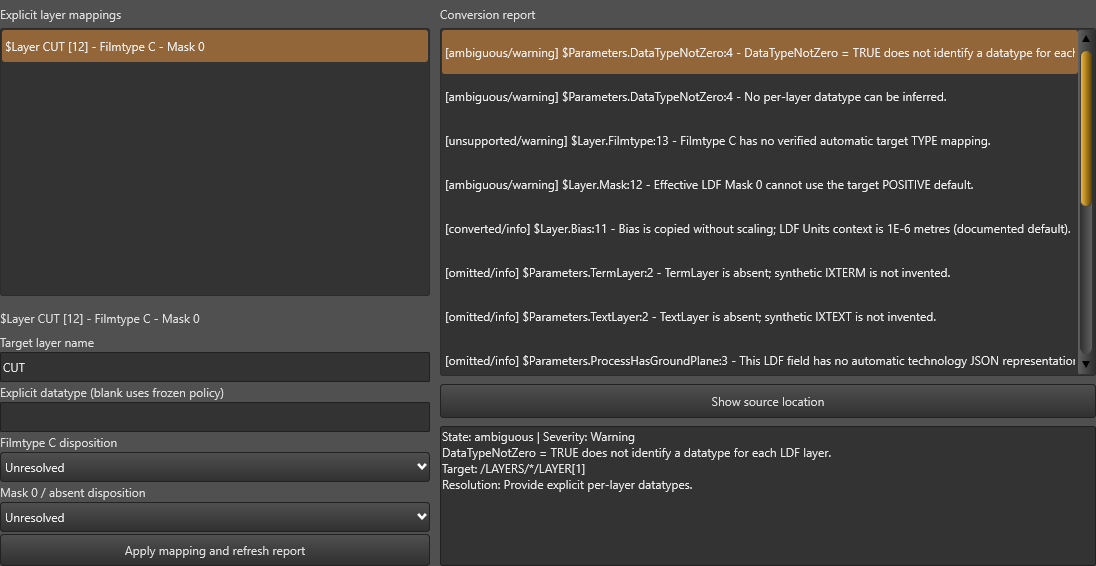
- Choose Tools > Export InductEx-LVS™ Technology JSON. Inspect the selected layer, conversion report and issue detail. Initially Export is blocked: datatype, Filmtype C and Mask 0 need explicit choices.
- Select the Filmtype issue and use Show source location if you need to inspect its LDF declaration. This returns to the source location without rewriting the LDF. Reopen the conversion command to continue.
- Use Cancel when you do not intend to export. Conversion Cancel and cancelling the later JSON destination write no JSON in the checked scenario.
Make deliberate target choices
The TYPE N, datatype 7 and POSITIVE selections are deliberate teaching choices. They are not inferred material physics, contact semantics or real GDS datatype information. For a real process, obtain the intended target rules and make the corresponding choices; do not copy these values merely to enable Export.
Filmtype C can be assigned an explicit supported type or omitted through the available disposition. Mask 0/absent can be explicitly omitted or assigned polarity. The exercised recipe uses TYPE N and POSITIVE; the other branches still need their own complete qualification. Blank datatype follows the documented policy: absence/FALSE permits zero, while TRUE does not identify each required datatype.
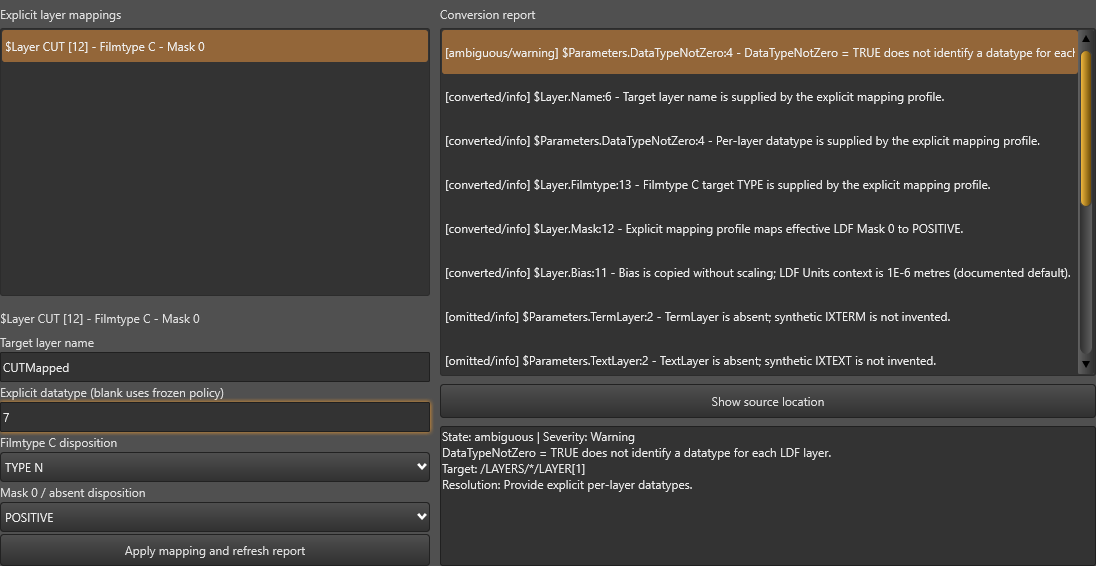
- Select CUT [12]. For this teaching case, enter CUTMapped as the target name and 7 as the explicit datatype. Choose TYPE N for Filmtype C and POSITIVE for Mask 0 / absent disposition.
- Choose Apply mapping and refresh report. A noninteger datatype is rejected; a target key such as CUT_bad blocks export in this converter. CUTMapped is the checked alphanumeric target key.
- Read the refreshed details and readiness state before Export. The checked mapping is ready with no blocked values, while the general DataTypeNotZero policy warning still contributes one ambiguous item. The per-layer datatype entry records the explicit resolution. Read the actual target and issue, rather than assuming every warning count must be zero.
- Choose Export and a new local destination such as mapped.json. Enable Save conversion report when you need its mapping/omission record, then save that report to its separate text destination.
Know which source text was exported
The production conversion snapshots the current analysed editor text. It does not silently save that text to the LDF. In the native check, changing Bias = 0.125 to an unsaved Bias = 0.25 produced BIAS 0.25 in exported JSON while the saved LDF stayed at 0.125. Normal Undo restored the original editor text; the next conversion produced BIAS 0.125.
Use the saved teaching input unchanged when expecting mapped.json to contain BIAS 0.125. If deliberately reproducing the unsaved-edit case, use a separate output and inspect it with --bias 0.25. Preserve the exact input state with the result. Reopening the command starts a fresh mapping profile in this action; re-enter the required choices rather than assuming the earlier dialog choices were saved.
Bias is copied without numeric scaling, and its LDF unit context is reported. This does not convert every physical process quantity into a target rule. Keep the original LDF and report for interpretation.
Compare the mapped teaching output
With the unchanged ambiguous.ldf and the stated choices, the complete target document is:
{
  "LAYERS": {
    "CUTMapped": {
      "LAYER": [
        12,
        7
      ],
      "TYPE": "N",
      "MASK": "POSITIVE",
      "BIAS": 0.125
    }
  }
}
Inspect the direct example
- Open direct.ldf, wait for current analysis and invoke the same Tools command. The checked direct film mappings are ready without explicit overrides.
- Export a new direct.json. Verify A/I/N/R/S layer types, the original GDS layer numbers and default datatype zero. The I1 mask is NEGATIVE; the others are POSITIVE.
- Confirm synthetic IXTERM [63, 0] and IXTEXT [62, 0], copied S1 BIAS 0.125 and the translated layer Boolean expression. The source (A1 + I1) - N1 becomes (((A1 | I1)) - N1) in this writer.
- Read the omitted entries. Thickness, Order and other extraction-only fields are not target layer records; VIAS, DEVICES and other target definitions are not invented. These are reasons to retain the LDF and finish target technology review before an actual LVS run.
Distinguish the conversion states
| State | Practical interpretation |
|---|---|
| Converted | A value or explicit mapping was transferred. Verify its meaning and target identity. |
| Defaulted | The converter used a stated policy, such as datatype zero when DataTypeNotZero is absent/FALSE. |
| Omitted | The field/section is absent in the target. Determine whether it is required for the intended LVS technology. |
| Ambiguous / Unsupported | Read the target path and resolution. Some choices block the required target; the general datatype warning can remain after each layer is explicitly resolved. |
| Blocked | Required target values or validation are unresolved. Correct them before writing technology JSON. |
| Ready / exported | The converter can write this subset. It does not establish full process equivalence, target package compatibility or LVS success. |
Recover a save failure or optional report cancellation
- If the JSON destination is locked, read Could not save technology JSON. The checked real exclusive lock preserved the previous JSON byte-for-byte. Release the lock or select a new destination and reopen the conversion with the required choices.
- Treat JSON and report saves separately. If Technology JSON was saved, but the optional conversion report could not be saved appears, inspect the JSON already written; do not assume the complete operation rolled back.
- Cancelling the optional report destination also retains the JSON. The checked report cancellation created no report file. If you need both files, rerun the conversion into suitable fresh destinations and verify both.
- Review report files before sharing: they include the source location and conversion details. Keep private designs, process information and local paths out of a public example or support submission unless deliberately reviewed.
Let an agent inspect the exported examples
The optional standard-library script below checks only the complete teaching JSON shapes. Use it on the unchanged mapped.json and direct.json created above. It rejects an altered datatype instead of silently accepting the file. It does not run the converter, perform LVS, validate arbitrary technology files or prove that a process is physically correct. No packaged CLI conversion route is established by this guide.
Check both exported teaching files
$ErrorActionPreference = 'Stop'
$python = 'python'
& $python .\inspect_technology.py --input .\mapped.json --case mapped
if ($LASTEXITCODE -ne 0) { throw 'The exported JSON does not match the mapped teaching example.' }
& $python .\inspect_technology.py --input .\direct.json --case direct
if ($LASTEXITCODE -ne 0) { throw 'The exported JSON does not match the direct teaching example.' }
Save ambiguous.ldf
* Teaching conversion choices, not a calibrated fabrication process
$Parameters
ProcessHasGroundPlane = FALSE
DataTypeNotZero = TRUE
$End
$Layer
Name = CUT
Number = 12
Order = 0
Thickness = 0.1
Bias = 0.125
Mask = 0
Filmtype = C
$End
Save direct.ldf
* Teaching direct mappings, not a complete LVS technology
$Parameters
ProcessHasGroundPlane = FALSE
TermLayer = 63
TextLayer = 62
$End
$Layer
Name = A1
Number = 1
Order = 0
Thickness = 0.1
Mask = 1
Filmtype = A
$End
$Layer
Name = I1
Number = 2
Order = 1
Thickness = 0.1
Mask = -1
Filmtype = I
$End
$Layer
Name = N1
Number = 3
Order = 2
Thickness = 0.1
Mask = 1
Filmtype = N
$End
$Layer
Name = R1
Number = 4
Order = 3
Thickness = 0.1
Mask = 1
Filmtype = R
$End
$Layer
Name = S1
Number = 5
Order = 4
Thickness = 0.2
Mask = 1
Filmtype = S
Bias = 0.125
LayerOperations = (A1 + I1) - N1
$End
Save inspect_technology.py
"""Compare an export with one supplied teaching shape; this does not run LVS."""
import argparse
import json
import math
from pathlib import Path
import sys


def expected(case, bias):
    if case == 'mapped':
        return {'LAYERS':{'CUTMapped':{'LAYER':[12,7], 'TYPE':'N', 'MASK':'POSITIVE', 'BIAS':bias}}}
    layers = {}
    for number, name, kind, mask in ((1,'A1','A','POSITIVE'), (2,'I1','I','NEGATIVE'),
                                     (3,'N1','N','POSITIVE'), (4,'R1','R','POSITIVE'),
                                     (5,'S1','S','POSITIVE')):
        layers[name] = {'LAYER':[number,0], 'TYPE':kind, 'MASK':mask}
    layers['S1'].update(BIAS=0.125, LAYER_BOOL='(((A1 | I1)) - N1)')
    layers['IXTERM'] = {'LAYER':[63,0], 'TYPE':'IXTERM'}
    layers['IXTEXT'] = {'LAYER':[62,0], 'TYPE':'IXTEXT'}
    return {'LAYERS':layers}


def main():
    parser = argparse.ArgumentParser(description=__doc__)
    parser.add_argument('--input',type=Path,required=True)
    parser.add_argument('--case',choices=('mapped','direct'),required=True)
    parser.add_argument('--bias',type=float,default=0.125,
                        help='Expected mapped-case Bias; use 0.25 only for the deliberate unsaved-edit example.')
    args = parser.parse_args()
    try:
        if not math.isfinite(args.bias):
            raise ValueError('Expected Bias must be finite.')
        data = json.loads(args.input.read_text(encoding='utf-8-sig'))
        if data != expected(args.case,args.bias):
            raise ValueError('Export differs from the selected complete teaching shape; review layer identities, explicit mappings, Bias and omissions.')
        print(json.dumps({'status':'matched-teaching-shape','case':args.case,'layers':len(data['LAYERS']),
                          'scope':'Exact supplied teaching output only; no LVS execution, calibration or complete technology acceptance.'}))
        return 0
    except (OSError,ValueError) as error:
        print(str(error),file=sys.stderr)
        return 1


if __name__=='__main__':
    raise SystemExit(main())
Understand the exercised boundary
34 frozen current-source Windows native/artifact checks: production converter, unresolved and explicit mappings, source navigation, invalid datatype/key rejection, current unsaved text, Cancel, actual locked JSON failure, optional report failure/cancellation and fresh retry, direct film/annotation/Boolean mappings, preserved inputs and an independently executed teaching-output inspector. File selections are predetermined at the production dialog boundary; physical picker input, final packages and an actual LVS comparison remain pending.
The candidate uses the normal licence bootstrap and production conversion/export actions. No extraction or LVS comparison was run. The two images show the current native control state, while physical OS picker operation, final distributed UI, all profile/disposition branches and exact downstream LVS runtime acceptance remain open.
Sources and verification details
Recorded inputs/builds only. Complete walkthrough and final-package acceptance remain separate.
VAL-037 · Frozen unversioned Windows Studio candidate with Core 8.0.1; CPython 3.13.11 output inspector
34 frozen current-source Windows native/artifact checks: production converter, unresolved and explicit mappings, source navigation, invalid datatype/key rejection, current unsaved text, Cancel, actual locked JSON failure, optional report failure/cancellation and fresh retry, direct film/annotation/Boolean mappings, preserved inputs and an independently executed teaching-output inspector. File selections are predetermined at the production dialog boundary; physical picker input, final packages and an actual LVS comparison remain pending
Conversion transfers a bounded layer-mapping subset; omitted physical data, via/device/settings definitions, exact target LVS package applicability and final GUI release require separate review. No extraction or LVS comparison was run.
studio-technology-blocked
Windows Studio current-source native scenario, reviewed 4 November 2026
Shows mapping/report controls on the exercised source candidate. Export readiness is checked separately; physical pickers and final-package UI remain pending.
studio-technology-mapped
Windows Studio current-source native scenario, reviewed 4 November 2026
Shows mapping/report controls on the exercised source candidate. Export readiness is checked separately; physical pickers and final-package UI remain pending.
- inductex:docs/manual/studio_workspace.tex · Import / Export Center; the LDF technology converter has its own Tools command
- inductex:docs/manual/ix_ldf.tex · LDF layer/material/Mask/Filmtype definitions are the source model, not a complete target LVS technology
- published:lvs-manual-1.1.05 · Technology JSON layer, mask, Boolean, via and device vocabulary; exact target package pairing remains open
- validation:technology-conversion-windows-20261104 · VAL-037; six reviewed frozen conversion/export files, native dialog and actual artifacts/recovery; teaching inspector
- The production converter is outbound from LDF to an InductEx-LVS™ technology subset. No arbitrary external technology import or reverse conversion is established.
- The native source candidate is unversioned. Physical picker operation, exact target LVS package compatibility, real connectivity comparison and final distributed UI remain pending.
- Native captures show the actual mapping/report region. The source-path header lies outside the unedited crop; no private report text is offered as a download.
- The first scenario attempt accidentally used a save-oriented helper for the unsaved-text case; it failed and remains separate. Final runs use the real unsaved editor state. Intermediate image/checker assumptions were corrected before this evidence snapshot.